XPath
即为XML路径语言(XML Path Language),它是一种用来确定XML文档中某部分位置的语言

总结及注意事项
- 获取文本内容用 text()
- 获取注释用 comment()
- 获取其它任何属性用@xx,如
- @href
- @src
- @value
In [1]:
from lxml import etree
In [18]:
sample1 = """<html>
  <head>
    <title>My page</title>
  </head>
  <body>
    <h2>Welcome to my <a href="#" src="x">page</a></h2>
    <p>This is the first paragraph.</p>
    <!-- this is the end -->
  </body>
</html>
"""
In [3]:
def getxpath(html):
    return etree.HTML(html)

s1 = getxpath(sample1)

# 获取标题(两种方法都可以)
#有同学在评论区指出我这边相对路径和绝对路径有问题,我搜索了下
#发现定义如下图
s1.xpath('//title/text()')
s1.xpath('/html/head/title/text()')
Out[9]:
['My page']
In [21]:
s1.xpath('//h2/a/@src')
Out[21]:
['x']
In [13]:
s1.xpath('//@href')
Out[13]:
['#']
In [14]:
s1.xpath('//text()')
Out[14]:
['\n  ',
 '\n    ',
 'My page',
 '\n  ',
 '\n  ',
 '\n    ',
 'Welcome to my ',
 'page',
 '\n    ',
 'This is the first paragraph.',
 '\n    ',
 '\n  ',
 '\n']
In [22]:
s1.xpath('//comment()')
Out[22]:
[<!-- this is the end -->]
In [23]:
sample2 = """
<html>
  <body>
    <ul>
      <li>Quote 1</li>
      <li>Quote 2 with <a href="...">link</a></li>
      <li>Quote 3 with <a href="...">another link</a></li>
      <li><h2>Quote 4 title</h2> ...</li>
    </ul>
  </body>
</html>
"""
In [24]:
s2.xpath('//li/text()')
In [28]:
#所有的li
s2.xpath('//li/text()')
Out[28]:
['Quote 1', 'Quote 2 with ', 'Quote 3 with ', ' ...']
In [38]:
#获取第1个li
s2.xpath('//li[position() = 1]/text()')
s2.xpath('//li[1]/text()')
#获取第2个li
s2.xpath('//li[position() = 2]/text()')
s2.xpath('//li[2]/text()')
Out[38]:
['Quote 2 with ']
In [79]:
#所有基数位的li
s2.xpath('//li[position() mod2 = 1]/text()')
#所有偶数位的li
s2.xpath('//li[position() mod2 = 0]/text()')
#取li最后一个的
s2.xpath('//li[last()]/text()')
Out[79]:
[' ...']
In [78]:
# li下面有a的
s2.xpath('//li[a]/text()')
#li 下面有a活着h2的
s2.xpath('//li[a or h2]/text()')
Out[78]:
['Quote 2 with ', 'Quote 3 with ', ' ...']
In [90]:
#获取a 和 h2
s2.xpath('//a/text()|//h2/text()')
Out[90]:
['link', 'another link', 'Quote 4 title']
In [110]:
sample3 = """<html>
  <body>
    <ul>
      <li id="begin"><a href="https://scrapy.org">Scrapy</a>begin</li>
      <li><a href="https://scrapinghub.com">Scrapinghub</a></li>
      <li><a href="https://blog.scrapinghub.com">Scrapinghub Blog</a></li>
      <li id="end"><a href="http://quotes.toscrape.com">Quotes To Scrape</a>end</li>
      <li data-xxxx="end" abc="abc"><a href="http://quotes.toscrape.com">Quotes To Scrape</a>end</li>
    </ul>
  </body>
</html>
"""
In [111]:
s3 = getxpath(sample3)
In [109]:
#获取 a标签下 href以https开始的
s3.xpath('//a[starts-with(@href, "https")]/text()')
#获取 href=https://scrapy.org
s3.xpath('//li/a[@href="https://scrapy.org"]/text()')
#获取 id=begin
s3.xpath('//li[@id="begin"]/text()')
#获取text=Scrapinghub
s3.xpath('//li/a[text()="Scrapinghub"]/text()')
Out[109]:
['Scrapinghub']
In [113]:
#获取某个标签下 某个参数=xx
s3.xpath('//li[@data-xxxx="end"]/text()')
s3.xpath('//li[@abc="abc"]/text()')
Out[113]:
['end']
总结及注意事项
- 根据html的属性或者文本直接定位到当前标签
- 文本是 text()='xxx'
- 其它属性是@xx='xxx'
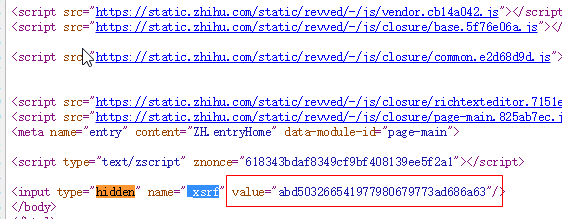
- 这个是我们用到最多的,如抓取知乎的xsrf(见下图)
- 我们只要用如下代码就可以了
In [186]:
sample4 = u"""
<html>
  <head>
    <title>My page</title>
  </head>
  <body>
    <h2>Welcome to my <a href="#" src="x">page</a></h2>
    <p>This is the first paragraph.</p>
    <p class="test">
    编程语言<a href="#">python</a>
    <img src="#" alt="test"/>javascript
    <a href="#"><strong>C#</strong>JAVA</a>
    </p>
    <p class="content-a">a</p>
    <p class="content-b">b</p>
    <p class="content-c">c</p>
    <p class="content-d">d</p>
    <p class="econtent-e">e</p>
    <!-- this is the end -->
  </body>
</html>
"""
In [187]:
s4 = etree.HTML(sample4)
In [188]:
s4.xpath('//p[@class="test"]/text()')
Out[188]:
[u'\n \u7f16\u7a0b\u8bed\u8a00', '\n ', 'javascript\n ', '\n ']
In [189]:
#获取p下面的所有文字
print s4.xpath('string(//p[@class="test"])').strip()
编程语言python
    javascript
    C#JAVA
In [176]:
#获取所有class中有content的
s4.xpath('//p[starts-with(@class,"content")]/text()')
s4.xpath(('//*[contains(@class,"content")]/text()'))
Out[176]:
['a', 'b', 'c', 'd']